Large Scale Central

Signals on the NVRY

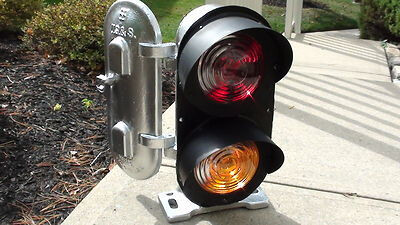
To survive outside, I’d really like to have the signals made of steel. The one in the above picture is made out of steel tube and steel washers. I need to find oval washers that arent stainless steel. So far all I’ve found are either SS ones, or expensive per-unit, and I really dont like the cost, or the idea of drilling holes in SS.

These are what I’m looking for, but not at a buck and a half each.

They are called “closet washers” for plumbing. Check out plumbing supply stores. I found these and others however the others I found do not list the hole size.

https://hdsupplysolutions.com/p/proplus-1-4-or-5-16-metal-oval-washers-for-closet-bolt-package-of-50-p342452

https://www.generich.com/grs/Zinc-Plated-Steel-Oval-Washer--P176.aspx

Did somebody say “dwarf signal”?
Mine will work for beer.
trish1

Have fun, David Meashey

I just now looked at your link and the extra $1 is because it’s vintage Jaguar.
:laughing:

Hm. That’s might have to see if my local non-chain hardware store has those. Thanks Rooz!

Couldn’t find something premade that was the correct size, so a few hours in CAD gives me a reasonable representation of a 3-light US&S N-2 dwarf signal.


These will be wired to a standard 7 pin connector. The wires feed through the a hole and the connector screws into the base. I will pot the wires at the connector in epoxy.


The wires snake up into the signal head and will be soldered to the LEDs and resistors.

Then the signal plugs into the base and will be glued. The signal face will be glued to the back as well. I might even pot everything inside in epoxy as well.

The back of an N-2 has some details (hinge, latch, vents) which I will add a hint of.

image

2 Likes

Aaaww, you even did your nails for the pics.

This has been shipped, and should be here on Monday.

Here’s a 3d-ish view of the panel. It’s not as thick as this image shows, but it does show how it’s laid out better than the flat file.

These panels are usually painted either black or a medium-deep green.

I think an camo green or olive might do it.

2 Likes

So who puts the train back on the track if it derails?

image

What’s Leon Buck doing here?

Testing how the LEDs look. Gonna call these good.

4 Likes

The mainline signals will mostly be Type G Trilights.

Easy enough to design and print in two parts plus a pole mount.

Wiring them is fairly straight forward. Common leads get soldered together, and the current resistors get attached to each aspect’s LED. Then the wires are soldered to the other end of the resistors. Everything inside will get a nice coat of 5-minute epoxy.

3 Likes

Insures that they won’t fail to moisture for a long time, but if they do, full replacement will be needed. You might want to print a bunch of spares while you have everything set up. Then the challenge will be finding them years from now when you need one!

So, once this is all functional, do you plan to run opposing trains on the single track main?

Yea, V2.0 of these signal heads will be some kind of plug-and-play with a set screw, instead of hard wiring and epoxying everything.

Speaking of wiring…

Exactly, theoretically at least. JMRI can run the signal logic on its own. Longer-range plans would have a dispatcher running them on the ctc panel (see previous image)

2 Likes

Getting signals to work in JMRI involves a lot of steps. None of them are particularly difficult, but there’s a lot of fiddly work that you have to do.

First order of business is to draw your track plan. My layout is basically a loop with three passing sidings. Going counter-clockwise, at the top left is Burke. Next, Williamsport is the siding at the bottom left, the branch to Majestic is the switch at the bottom right with no connection. Then we have Dead Rooster Gulch. The yard at Franklin Falls goes off the top. I’ll flesh out both the Franklin Falls and Majestic branch at a later time, since I really want to get the mainline signaled first.

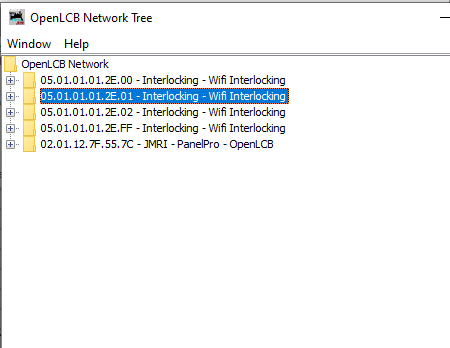
The two digit IDs (FF, 00, 01, etc) are part of the hardware ID for the nodes that will control the signals and track around the switch. This is for my reference and will be removed at a later date.

Now we start adding inputs and outputs from the hardware. Here you can see I have 4 of my interlocking nodes plugged in to the system. You can see the IDs are ‘05.01.01.01.2E.xx’ where ‘xx’ is the ID of the node in the track plan. The 05.01.01.01.2E has been assigned to me by the OpenLCB working group as a developer, so I know no other hardware I ever buy from other vendors will have an ID conflict. I need to go into each node’s configuration here and edit the names of the input and output ‘bits’ to an appropriate value. The second screen below shows Block 1, Block 2, etc as inputs, and S1Red, S1Yel, etc, as outputs.

The inputs are for block detection devices, and additionally I can have 4 aux inputs on each node for things like switch detection, etc.

The outputs are for individual aspects on the signal (S1Red is "Signal 1, red aspect) etc. Each bit here maps to a signal light, and then a ‘signal head,’ which I will get to in another post.
image

Basically this is tedious because for each control point (switch) I need to make sure the 4 sets of signal colors have unique names that I can identify later.

Now we get to Signal Heads. These are the actual things that have colored lights in them. It took me a while, but now I understand why they added this complexity. I could have up to 3 signal heads on a mast, and some of them could be 3 light, some 2, and each one could have different ‘rules’ associated with how they are displayed.

Anyway, you make a signal head and then attach it to outputs. On this screen for Signal Head 1 (SH1) you can see I have attached the S1Grn, S1Yel, and S1Red outputs to this signal head. Digging deeper you can see the events that this signal responds to, with the previously discussed 05.01.01 etc events (there are two events, an ON and OFF event) for each output.

image

And here we se the 16 signal heads I have set up so far.

Next up we ‘put’ these signal heads on a mast. This corresponds to the actual physical signal that will sit someplace on the layout. This particular signal mast is the one that guards coming into Burke yard after you leave Williamsport and head uphill. It is a “double searchlight signal” which means, basically, two signal heads. It uses the “Basic Enhanced” signal logic. There are far more complex signal logics available in JMRI, if you wanted to have your signals work like, for example, CSX, they have that logic as well. But for my small RR, Basic Enhanced will work well enough.

Anyway, you can see I have signal heads SH1 and SH2 on this particular mast.

image

Signal aspect test.

Running through the available aspects on a two-head tri-light signal. This is the signal will be guarding the approach to Burke yard. Aspects shown in order are:

Stop
Clear
Approach
Advanced Approach
Diverging Clear
Diverging Approach
Diverging Advanced Approach
Stop

https://youtube.com/shorts/VKT8Fm8w4Ks

This will be fantastic Bob.

Maybe I missed it, but what are you using for block occupancy detection?