I’ve used OctoPrint/OctoEverywhere to monitor my printer when I’m not home. Works great. I havent used the “Cancel Object” plugin, so I can’t give feedback on that.
I manually cancel stuff all the time on the Bambu and can do it from the printer or the computer. I’ve not had occasion to “tell it where to stop” for whatever reason, though it can.
Sometimes you just want to cancel a job before it starts the actual printing because it allows things to heat up before you get to the actual job. Especially important with ASA. The Bambu goes through several heat/cool cycles for both the head and plate before the actual printing begins.
For example, it heats the plate before it levels it because a hot plate would have thermal expansion and this should be compensated for.
I’ve had far fewer print failures in recent years, thanks to the tweaks and software updates my machine has undergone. However, I’m still hesitant to print multiple items at once. The frustration of losing an entire sheet of prints because just one failed has kept me from doing so. Instead, I find myself making multiple visits to check on my printer, waiting for each print to finish before reloading, reheating, and restarting the process.
I’m excited to see printer manufacturers integrating live cameras and time-lapse photography into their designs. But what excites me most is the ability to selectively delete a failed print mid-process, as demonstrated in this 1½-minute Bambu review.

Has anyone had any unexpected pleasant surprises when they purchased or upgraded their printer?
- The Arachne slicing engine is the most recent pleasant surprise for me. I’ve been able to switch to a 0.6 Nozzle with almost imperceptible change in the quality of my prints and a noticeable increase in printing speed.
Bill, I can’t answer your question, but can very much empathize with your angst over multi-part prints. I’ve had that same experience quite consistently, to the point of always printing only one part at a time. And that’s just with PLA.
As I’ve looked over various vids on the “Core XY” sorts of machines, with heated chambers and higher temps, I was astounded that people are running farms with tens of these machines, sometimes making multiple parts each.
As I’m typing this out, I guess my big thing is to be able to print multiple parts at a time, in ASA or whatever I want, and have them come out with a low failure rate. That would allow me to make my dream consist of multiple (like, 30) V&T ore cars, and perhaps offer them as kits.
OHHHHH! So, that’s what that “skip” button does! I was wondering about that… This is super helpful to know about since I intend to typically fill my print bed whenever possible. Thanks for the video, Bill!
@Todd_Brody I just got the A1 Mini. Not the same machine, but I’d be happy to show you the current machine settings (I haven’t played with anything in the machine itself yet, only in slicing), if you think it’d be helpful.
Yes, the slicer settings would probably be the same.
As for printing multiple parts simultaneously…,
I agree that nobody wants an errant piece to wipe out a bunch of pieces and also tend to print one thing at a time.
BUT…, consider that to do a couple minute print, the machine will spend 6 minutes going through its regular routines. You can reduce this time by telling it not to level the bed or calibrate the flow, and I will sometimes do this if I am trying to get a part to size without being overly concerned with the ultimate quality after I’ve been printing the same thing a couple times in a row.
OK, so consider the stairway I previously displayed. There are 24 steps and ironed solid, each step takes ~44 minutes. So the print time is 24 x 44 + 24 x 6 = 1,200 minutes = 20 hours just for the steps, if you do a step at a time.
So after I printed 4 or 5 individual steps, I modified the file to do 10 at a time. So the print time was reduced by 108 minutes or 1.8 hours. (The 44 minutes were also slightly reduced because the machine doesn’t have to vertically travel nearly as many times, and this also saves wear and tear as well as wear and tear from the leveling process, which does wear the plates from the bumping action.
AND just as importantly, those would typically be 108 minutes where you are overseeing the start of the print while it does its thing to be sure that the first layer starts properly.
So, ultimately, it comes down to the job. For example, if you were doing ties, you would want to do several at once.
Cliff while you’re researching a new printer, have you tried using a raft setting for your bed levelling issues?
I think I’ve tried that, brim, skirt, and other approaches for bed adhesion. But for levelling, I’m not sure how that relates?
its for evading, that the “spout” hits the plate on one side, while laying the first layer into thin air on the other side of the print.
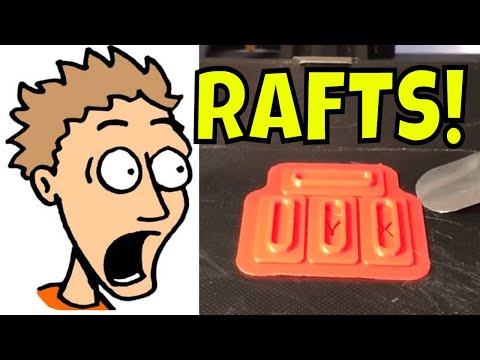
The raft is handy for a warped bed
Thanks Bill, no, I haven’t done that.
It’s not really applicable to my situation, but good to know.
I’m sure someone more patient than I could make my machine work well. In fact, if I level the nozzle to the center of the build plate, I can make fairly large parts; but not out to the extents of the build plate, where things will fail.
It doesn’t matter though, because even if that weren’t an issue,
- The nozzle can’t get hot enough for the material I want
- The bed can’t get hot enough for the material I want
- The build speed will never be good
- My upgrading give-a-crap meter is hovering around -23.
I started out some 6 years ago, all gung-ho on learning and modifying and buying upgraded parts. But that faded in a year or two.
So, I’m afraid I have to admit that I’m one of those who just want the dang thing printed. Well, multiples of the dang thing. Preferably with some reliability.
Wow Cliff I don’t know if I would have persisted with all those issues!
You’re probably going to be amazed with your next printer. Have a look at the videos that are raising questions about 0.4 nozzles becoming obsolete and consider getting an extra 0.6 to try out. I’ve just turned on my Aracne settings and an having trouble finding any detail deficiencies but getting faster print times.
Don’t throw out the old printer though. A Luke warm nozzle and cool print bed might come in handy other ways.
For those who have held off…,
Coming March 25th. Note the build size 350x320x325 and double extruders! $2,899


I’ll have to sell a kidney
… or just print it. That’s the beauty of having two extruders, or so I’ve heard…
If this thread has done one thing for my 3D Printer fantasies it’s to teach me I’ll never be satisfied with an entry level printer and that I can’t afford one of these cadilacs!
The low-cost printers are fine, you just need to have the right mindset for them. They arent like buying an ink jet printer and just expecting it to work. They take a bit of fettling to get them set up right, and there’s some maintenance considerations. And you have to accept that print failures will happen, often 16 hours into a 17 hour print. But there’s nothing wrong with the current batch of < $400 printers.
The double extruders make a lot of sense, and I am not talking about for color. It most often preferable to use a different material for the supports and brims because it is cheaper or easier to remove. Some are even water soluble. With a separate head, you don’t have to purge the extruder at every layer (time and wasted materials) if your build has supports.